

We redesigned the DockFrame hub, and it's more powerful now: 140 W in, video on every slot
Quick context if you're new here: DockFrame is a modular USB-C hub built around the Framework Expansion Card format. You slide in standard Framework cards or our own Tool Cards (multimeter, power supply, breadboard carrier) and the dock becomes whatever your desk needs that week.
We put a sign-up form online in December and asked one open question: how would you use this? We were expecting checkbox-length answers. What came back was paragraphs, over a thousand of them by the time we sat down to lay out the second revision of the main board.
Two things in that pile changed the hardware. Here's both, including the one where we'd got it wrong.
The charger was taking a slot
Starting with the one we're less proud of.
The hub has four card slots. That number has been on every render and every spec sheet since we started, and it wasn't quite true. With a charger plugged in you had three.
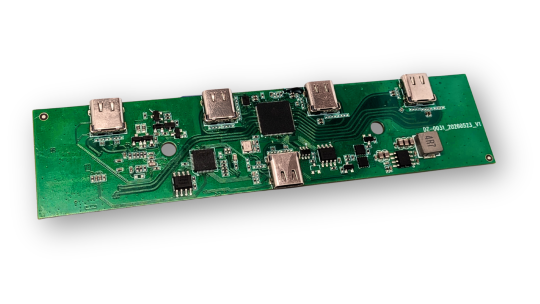
Here's how the first board worked. Five USB-C connectors: four downstream ports and one uplink to your computer. Power arrived through one of those four downstream ports. With no charger connected, that port behaved like any other slot and you could put a card in it. Plug a charger in and the port became a power input, and the slot was gone.
So the accurate description of the old hardware was "four slots, or three slots and a charger." Almost nobody runs a dock without a charger.
It was also the wrong three, which is the part that stung. The Power Supply Card is the card that most wants a charger connected, because at full output it needs more than a laptop can spare. The card with the biggest appetite for external power was fighting for a slot with the thing that feeds it.
Why we did it that way
Worth explaining, because it's a reasonable trade and we'd probably make it again on a different board.
A USB-C port that can take power in and hand power out is cheaper. One connector, two jobs. You save the board area a sixth connector needs, you save its ESD protection, and you skip a second high-current path across the PCB. On a board that has to fit in a case small enough to live on a desk, connector space is the tightest budget you've got.
It read fine on paper too. USB-C is built for role swapping, so a port negotiating its own direction isn't a hack. It's what the standard is for.
What we underrated was how it reads to somebody holding the box. A port cleverly changing roles is invisible. A slot count isn't.
The fix
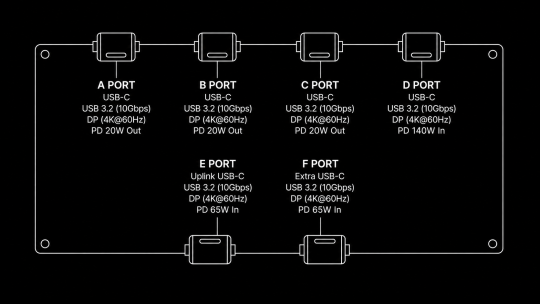
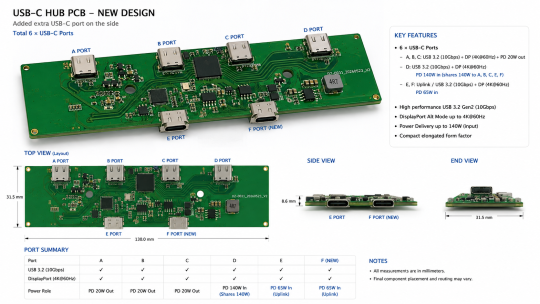
The power input is its own connector now, wired only as an input, with its own path to the power stage. Six connectors instead of five:
■ Four downstream card slots
■ One dedicated power input, up to 140 W over USB PD
■ One uplink to your computer, with up to 65 W going back the other way to charge your laptop
Four slots, charger or no charger.
Every port drives a display
The other thing that came back from the form, louder than anything else, was display output. One cable to the laptop, monitor on the far end, no second dongle hanging off the side.
There's a cheap way to do that. You put DisplayPort Alt Mode on one downstream port, print a little monitor icon next to it, and let people work out which hole to use. Loads of docks ship exactly like that, and on a spec sheet it still reads "supports 4K."
We didn't want a dock where slot 3 drives a monitor and slot 1 doesn't. If you have to remember which port is the special one, you're thinking about your dock, which is the opposite of what a dock is for.
Every downstream port on the new board is the same port:
■ DisplayPort Alt Mode, targeting 4K at 60 Hz
■ USB 3.2 data, up to 10 Gbps SuperSpeed
■ USB Power Delivery, up to 20 W out
Four slots, four identical ports. Your monitor goes wherever there's space. So does your SSD enclosure, your capture card, or that Framework card you already own.
The cost of this one is routing. Video has to reach four destinations instead of one, and video pairs are just as fussy about length, impedance and crosstalk as the SuperSpeed pairs we wrote about earlier. Doing it four times over on a compact board is most of where the layout time went.
Where the 140 W goes
The dedicated input takes Extended Power Range, 28 V at 5 A. That's 140 W arriving on one connector.
Out the other side:
■ Up to 65 W back up the uplink to charge your laptop
■ Up to 20 W of USB PD on each downstream port
Add those up and they come to more than 140 W. That's on purpose. The budget is shared dynamically, so the hub looks at what the host is asking for, what each card is asking for, and what the charger can really deliver, then allocates. You won't get 65 W to the laptop and 20 W on all four slots at once, because no 140 W charger can do that. You get whatever combination fits, and the hub works it out instead of making you do the sums.
Giving the input its own connector is what lets us print those numbers with a straight face. 5 A is a lot of current for a connector that also has to behave like a general purpose port on alternate Tuesdays. A dedicated input gets built for one job: wide copper, short path, no role negotiation in the way.
Usual caveat, these are design targets for the first production run rather than measured values. We'll publish the test numbers when boards come back.
What it cost us
A sixth connector is more board edge gone, more ESD parts, another opening in the case. The high-current path needed redoing, since 5 A wants copper that a 3 A path doesn't. Video on four ports is more differential pairs competing for room on the same layers as the SuperSpeed routing. And the enclosure had to follow the board, which stops being a small edit once you're looking at injection mould tooling instead of a printed prototype.
Fair trade, we think. You're the ones who told us it was.
On slot count
The request we still get most is more slots. Six. Eight. Somebody asked for twelve.
A physically bigger main board is a different product and a different design cycle, and we're not going to promise it for this run.
There is a difference, though, between adding a slot and stopping ourselves taking one away. If you were planning your four cards and working out where the charger was going to live, you can stop. It has its own connector now.
Support Us on Crowd Supply
We're on Crowd Supply, and we need your help to bring DockFrame to more people. Your backing makes it possible to keep prices low and quality high, so everyone can enjoy the power of an open-source modular USB Hub ecosystem.

Check out the campaign and get involved: DockFrame on Crowd Supply

