

USB-C Is Not What You Think It Is (And That's a Problem We're Solving)
If you ever plugged a USB-C cable expecting fast charging and got a trickle instead, or connected a display and just stared at a black screen, you already know the dirty secret of USB-C: the connector lies to you.
Well, not exactly lies. But it doesnt tell the whole truth either. And after spending the last several months deep in USB-C system design for a hardware project we're working on (more on that soon), we learned that understanding USB-C means unlearning almost everything the marketing told us.
The connector is just a shape
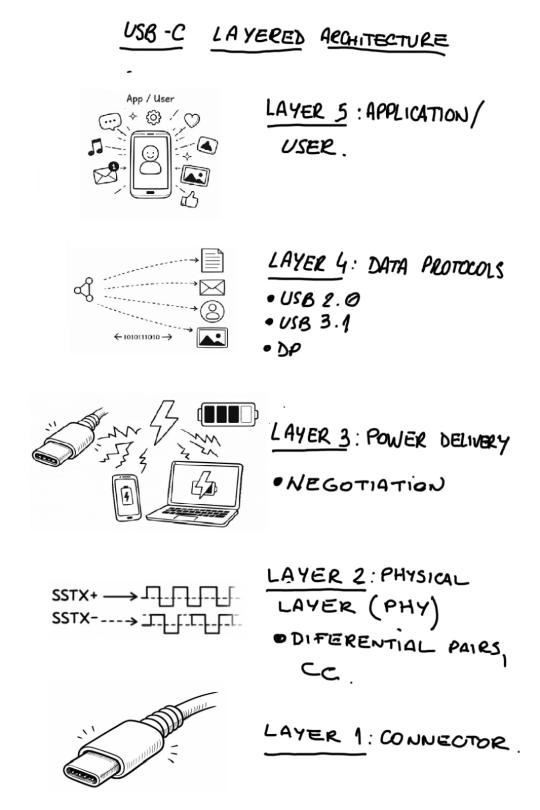
Heres the mental shift that changes everything: USB-C is not a technology. Its a form factor.
That reversible oval? Its just the mechanical spec, the pinout, the shape, the fact you can plug it in either way without wanting to throw your laptop out the window. It says nothing about speed. Nothing about power. Nothing about wether your display will actually work.
Two devices with identical USB-C ports can behave in completly different ways. One might transfer data at 10 Gbps while another crawls at USB 2.0 speeds. Same connector. Wildly different capabilities. This isnt a bug, its the architecture working as designed. The problem is nobody explains it this way.
Speed lives in a different layer
When we talk about "fast USB-C," we're really talking about USB 3.1 (or its successors), a completly separate spec that happens to use the USB-C connector. USB 3.1 brings high-speed differential pairs, full-duplex communication, and multi-gigabit transfers. But getting this to work requires dedicated controllers, careful PCB routing, and internal multiplexers to handle connector reversibility.
None of this comes free with the connector. You have to design for it.
We learned this the hard way when laying out our first high-speed USB-C interface. The signal integrity requirements are no joke. Trace length matching, impedance control, via minimization, its a whole discipline on its own. And heres the thing: you can have a perfectly working 10 Gbps data link that still only delivers 5V of power. Speed and power are independent systems sharing the same connector.
Power is a negotiation, not a guarantee
USB Power Delivery (USB PD) is where things get genuinly clever. Instead of the old "plug it in and hope for 5V" approach, PD turns power into a conversation.
Before any voltage increase happens, the source and sink talk to each other over the connector's config pins. They negotiate: What voltages can you supply? What does the device need? Whats the cable rated for? Only after they agree does the voltage actualy change. Its elegant, safe, and when you're implementing it, suprisingly complex.
This negotiation enables something that still feels like magic to us: a single port can be a power source, a power sink, or switch between roles on the fly. Your laptop can power your phone, or your phone can power a peripheral. The old mental model of "chargers" and "devices" starts falling apart.
For our current project, this flexibility has been both a blessing and a headache. We're designing a system where power roles need to shift based on context, not a trivial thing to get right, but exactly the kind of capability that makes USB PD worth the pain.
Your cable has opinions
Heres something that surprised us: in USB-C, the cable isnt always passive. Some cables have active electronics inside that report their capabilities back to the system. This isnt just metadata, it directly limits how much current can flow and how much power gets delivered.
Two cables that look exactly the same can behave completly different. We saw this cause real confusion during testing: "Why isnt this charging at full speed?" Because the cable said no.
This just reinforces the main point: USB-C is a distributed system, not just a wire. The connector, the cable, and both endpoints all participate in figuring out what actualy happens when you plug something in.
Why this satisfies for what we're building
We're not writing this as some theoretical exercise. We're neck-deep in USB-C implementation right now, working on a modular hardware project that relies on getting all these layers right. Power negotiation, high-speed data, role switching, hot-plug handling, its all part of what we're doing.
The deeper we go, the more we understand why so many USB-C products feel unreliable or confusing to users. The technology is genuinly sophisticated, but that sophistication is invisible. When it works, it feels like magic. When it dosent, it feels like betrayal.
We're trying to build something that works reliably precisely because we understand these layers, not despite them. We'll share more details soon, but for now lets just say: if you ever wished USB-C "just worked," we're working on it.
The takeaway
Next time you plug in a USB-C cable, remember: you're not connecting two wires. You're starting a multi-layer negotiation between controllers, protocols, and active components, all of which need to agree before anything interesting happens.
That simple gesture triggers a bunch of invisible decisions about data rates, power levels, and device roles. Understanding this is the first step toward designing systems that use USB-C on purpose, and toward explaining it without the usual oversimplifications that got us into this mess in the first place.
Stay tuned. We got something in the works that puts all of this into practice.

